What this guide is really about
If you post every day but feel like you are starting from zero each morning, you probably do not have an evergreen content problem. You have a system problem. Evergreen content is the stuff that stays useful weeks, months, or even years after you publish it. The hard part is not knowing what evergreen means. The hard part is building a library that actually fits into your weekly workflow without turning into a pile of recycled posts that bore your audience.
This guide gives you a complete lifecycle system: how to identify evergreen material, build posts that last, schedule them through your queue, refresh them before they go stale, and retire them when they stop earning attention. It works for solo creators, small content teams, and anyone publishing to text-first platforms like Threads where the same advice can resurface and reach new readers months later.
An evergreen content strategy is a repeatable system for identifying content that stays relevant, turning it into durable posts, scheduling it in rotation, and refreshing it before it expires. The goal is not to post evergreen ideas once. It is to build a working library that fills gaps in your calendar, reduces daily creation pressure, and keeps delivering value long after the publish date.
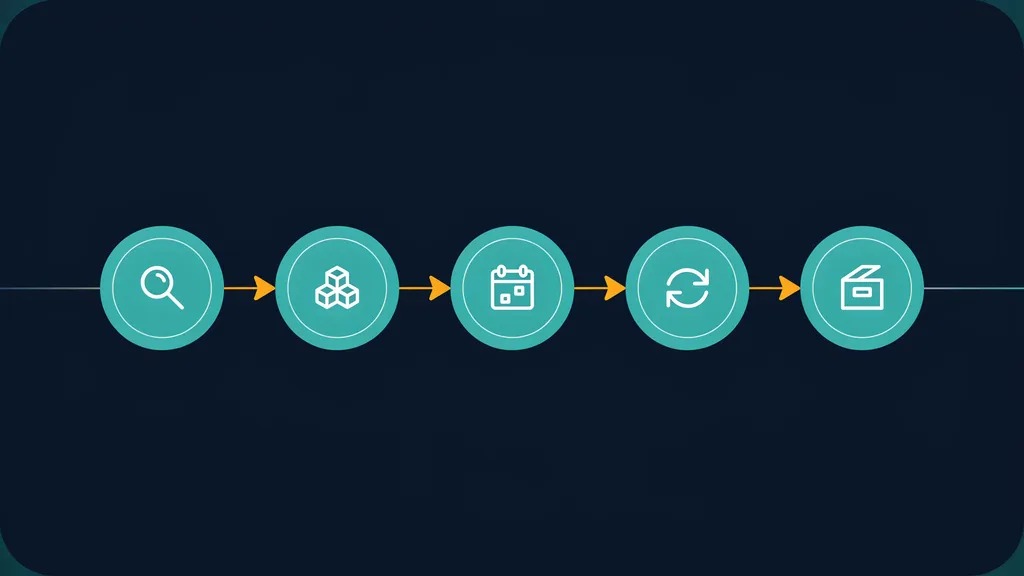
A five-stage lifecycle system you can run weekly
A four-question shelf-life test for every post idea
A refresh rotation that keeps old posts from going stale
A Threads-specific adaptation for text-first evergreen content
Evergreen is a lifecycle, not a category. Content is born, scheduled, refreshed, and eventually retired.
Most evergreen guides stop at idea lists. The value is in the system that keeps those ideas working over months.
Run a refresh rotation every 6 to 12 weeks so posts stay accurate without rewriting everything from scratch.
Text-first platforms like Threads are ideal for evergreen rotation because short posts resurface naturally in feeds.
Retire posts that stop earning engagement. A library is only useful if dead weight gets removed.
What Evergreen Content Actually Means (And What Quietly Expires)
Evergreen content stays relevant without needing constant updates. A post explaining how to write a strong opening line for a social post is evergreen. A post about a specific platform feature that changed last month is not. The distinction sounds obvious until you start auditing your own feed and realize how many posts you thought were timeless are actually tied to a moment.
The most common trap is confusing popular with evergreen. A trending topic can drive a spike of attention and then become useless within a week. Evergreen content does the opposite. It starts slower, but it compounds because the same post can be reshared, adapted, or resurfaced months later and still make sense to a new reader.
Here is what quietly expires even when it looks durable: statistics that age fast, tool names that get rebranded, screenshots of interfaces that change, references to specific platform versions, and advice tied to a season or event. A post about the general principles of writing engaging replies stays evergreen. A post naming the exact character limit of a feature that gets updated twice a year does not. Content marketing resources like HubSpot's guide to creating evergreen content classify how-to guides and foundational explainers as the types most likely to retain value over time, which aligns with the shelf-life test below.
The Shelf-Life Test: A Four-Question Decision Matrix
Before you invest time building a post as evergreen, run it through four questions. This shelf-life test saves you from tagging content as timeless when it actually has a hidden expiration date baked in.
First, will this advice still make sense in twelve months? If the answer depends on a current interface, pricing tier, or platform policy, it is not evergreen. Second, does the core principle hold even if specific details change? A framework for deciding what to post is evergreen even if the tools involved evolve. This is why your content pillars tend to produce evergreen material: they capture enduring themes rather than momentary tactics. Third, could a new reader discover this post next year and find it useful without context? Evergreen content is self-contained. Fourth, is the value in the structure or the specifics? If you remove the examples and the core idea still works, you have evergreen material.
Building Your Evergreen Library: Audit, Select, Adapt
Start by auditing what you already have. Pull your last three months of posts and tag each one as evergreen, semi-evergreen, or time-bound. Many creators find a meaningful share of past posts is already evergreen but was treated as disposable. Those posts are the foundation of your library.
Next, select which evergreen candidates are worth promoting to library status. A post qualifies if it answers a recurring question your audience asks, teaches a transferable skill, or captures a core principle behind your content pillars. Exclude anything that leans on a news hook, a specific metric, or a tool walkthrough that will go stale.
Finally, adapt each selected post into a library-ready version. Strip out time references, remove screenshots that will date the post, generalize specific numbers into ranges, and rewrite any phrasing that sounds like it belongs to a particular week. The goal is a post that reads naturally months from now without any edits. This adaptation step is where most creators skip the work and end up with a library full of half-expired posts. If you have a repurposing system already, you can run evergreen adaptation as a focused pass within it using the same source-to-format workflow you use for new content.
Treating evergreen as a content type instead of a lifecycle that needs scheduling and refresh
Stuffing the library with listicle-style posts that age quickly because they reference specific tools or pricing
Never retiring posts, so the library grows stale and drags down overall quality
Scheduling the same post back to back without spacing rotations at least four weeks apart
Skipping the adaptation step and reposting time-bound phrasing that sounds dated on second appearance
Scheduling Evergreen Content Through Your Queue
An evergreen library only works if it is actually scheduled. The approach is to blend evergreen posts with new and timely content so your feed stays fresh without forcing you to create from scratch every single day. A practical split is to dedicate roughly one third of your weekly slots to evergreen rotation, one third to new original content, and one third to replies and engagement.
Build a rotation schedule that cycles through your library on a predictable cadence. If you have twelve evergreen posts, schedule two per week across a six-week cycle, then repeat. Space out repeat appearances of the same post by at least four weeks so regular followers do not see the identical post twice in close succession. You can vary the framing slightly each cycle by changing the opening line or swapping the example while keeping the core message.
When you batch your content for the week, include evergreen rotation as a designated slot rather than treating it as filler. This makes batching faster because you are not writing every post from scratch. If you use a scheduling workflow, evergreen posts slot directly into the queue alongside new content. The key is to treat evergreen scheduling as a deliberate calendar decision, not a last resort when you run out of ideas.

Refreshing and Retiring Evergreen Posts
Evergreen does not mean permanent. Even durable posts need a refresh cycle. Run a refresh pass every 6 to 12 weeks on your top performing evergreen posts. A refresh is lightweight: check that any cited details are still accurate, update examples that feel stale, tighten the opening line, and verify that links still resolve. You are not rewriting the post. You are keeping it healthy.
Track how each evergreen post performs across its rotation cycles. A healthy evergreen post maintains a baseline level of engagement each time it appears. When you notice a post dropping below half its original engagement on its second or third rotation, that is a signal to either refresh it significantly or retire it. Do not hold onto posts out of habit. A library full of underperforming posts drags down your overall content quality.
Retirement is a deliberate decision, not a slow fade. When a post no longer earns attention even after a refresh, remove it from the rotation and note why it expired. Maybe the advice got absorbed into a newer post, or the platform changed enough that the guidance no longer applies. Either way, retiring dead weight keeps your library lean and focused on posts that actually deliver value.
Threads and Text-First Evergreen Adaptation
Text-first platforms like Threads are well suited to evergreen content because short posts resurface naturally as new followers encounter your profile. A well-written principle-based post can earn replies and profile visits months after it first appeared. The key is writing evergreen posts that work as standalone units without requiring thread context or a specific timeline.
Adapt your library posts for Threads by keeping each one under the character limit and self-contained. Lead with the core idea, not a hook that references current events. If you are adapting a longer evergreen piece, serialize it into standalone posts using your existing repurposing approach. Each post in the series should make sense on its own because a new reader might only see one installment.
If you want a faster way to draft evergreen Threads posts from your existing material, the free Threads Post Creator can help you turn a library concept into a formatted post without starting from a blank page. For planning how those posts fit into your week, pair evergreen rotation with your content calendar so new and timeless posts support each other rather than competing for the same slots.
Measuring Your Evergreen Library
A good evergreen strategy has measurable inputs and outputs. On the input side, track how many library posts you have, how many are in active rotation, and how long since each was last refreshed. On the output side, track per-post engagement across rotation cycles, the share of your weekly reach that comes from evergreen versus new content, and how much creation time the library saves you each week.
The most useful signal is trend over cycles. A post that holds steady across three rotations is earning its library spot. A post that softens each cycle needs a refresh. A post that falls below half its original baseline after a refresh is a retirement candidate. Read your analytics with this lens rather than looking at raw totals, which conflate one-time spikes with durable value.
Action checklist
Use this as the practical next pass after reading the guide.
- +Audit your last 90 days of posts and tag each as evergreen, semi-evergreen, or time-bound
- +Apply the four-question shelf-life test to your top evergreen candidates
- +Adapt qualified posts into library-ready versions with no time references or stale examples
- +Build a rotation schedule that spaces repeat posts at least four weeks apart
- +Set a calendar reminder to refresh top posts every 6 to 12 weeks
- +Track per-post engagement across cycles and retire posts that drop below half their baseline

Conclusion
An evergreen content strategy is not about finding timeless ideas. It is about building a system that keeps those ideas working. The creators who benefit most are the ones who treat evergreen as a lifecycle with clear stages: identify what lasts, build it well, schedule it deliberately, refresh it on a cycle, and retire it when it stops earning attention.
Start small. Audit your existing posts this week, identify your top five evergreen candidates, and add them to your next rotation. A library of twelve solid evergreen posts, refreshed every couple of months, can cover a meaningful share of your weekly calendar and give you room to create new work without burning out.