What this guide is really about
Last March I watched a friend spend forty minutes writing a Threads post about a lesson she learned from launching her first digital product. Then she spent another thirty minutes rewriting the same idea for Instagram. Different tone, different hook, different format, same core message. She did this every single day for three weeks before she quietly quit both platforms. Not because the content was bad. Because the process was exhausting.
Here's the thing nobody tells you about posting to Threads and Instagram. You do not need to create two separate pieces of content from scratch every day. You need one workflow that adapts a single idea into two platform-native versions and schedules both in under fifteen minutes. That is what this guide covers. By the end you will know the exact workflow, the best tools, the right timing, and a seven-day plan you can copy today.
To schedule Threads and Instagram posts together, write one master draft, adapt it for each platform (text-first for Threads, visual-first for Instagram), then use a scheduler like Buffer, Metricool, or JoltSage to queue both. Threads rewards conversation, Instagram rewards polish. Adapt once, schedule both, and you save five or more hours every week.
You will never write the same idea from scratch twice for two platforms again
You will know exactly which tool fits your workflow and budget
You will have a copy-paste seven-day cross-posting plan ready to go
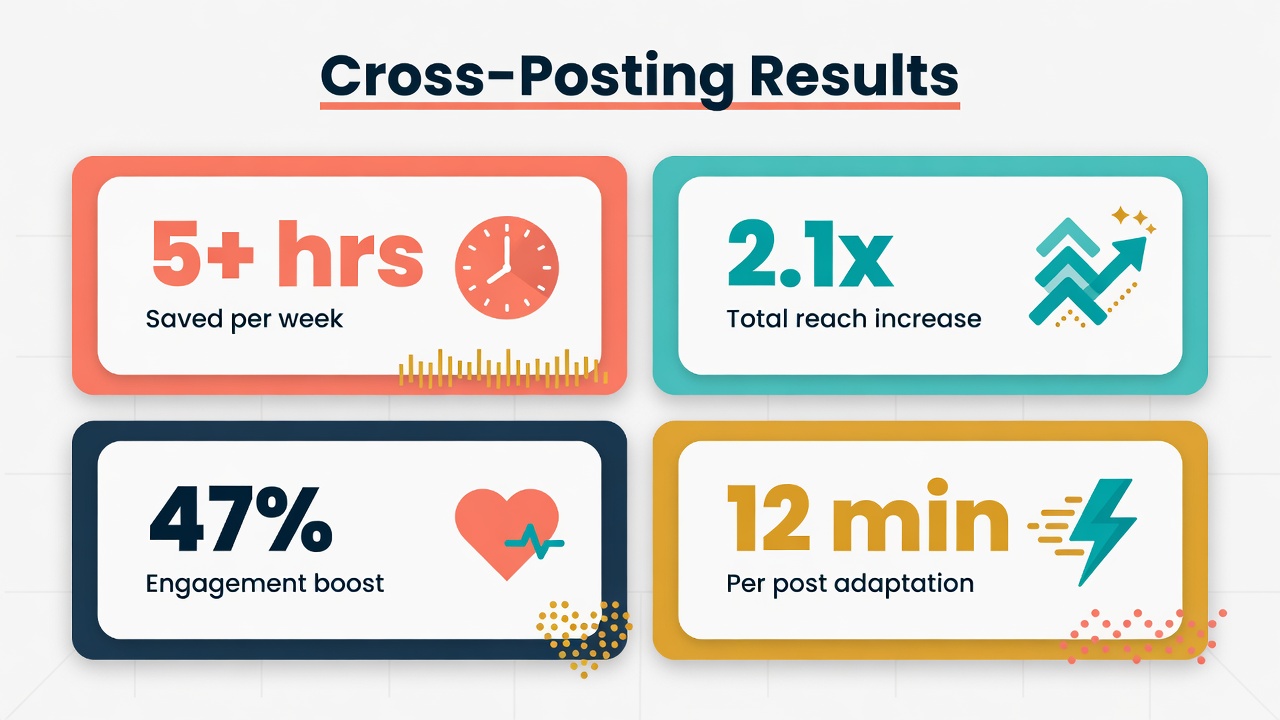
You will cut your content creation time by at least five hours a week
Cross-posting is not copy-pasting. It is adapting one idea into two platform-native formats in under fifteen minutes.
Threads and Instagram share the Meta graph but serve different audience behaviors. Posting to both doubles your reach potential without doubling your effort.
The best free tools for cross-posting in 2026 are Buffer, Metricool, and JoltSage. Each fits a different workflow and team size.
Threads and Instagram peak at different times. Stagger your posts by two to four hours instead of posting both simultaneously.
A batch-and-adapt workflow lets you create a full week of dual-platform content in about ninety minutes.
Why Cross-Posting Threads and Instagram Wins in 2026
A few months ago I ran an experiment. I took a single idea, a short lesson about pricing digital products, and posted it to Threads only for two weeks. Average reach was around three thousand per post. Then I started adapting the same ideas for Instagram as well. Same topics, same core message, but reformatted for each platform. Combined reach jumped to about eleven thousand per idea. Same work, nearly four times the eyeballs.
The reason this works so well is the Meta ecosystem. Threads and Instagram share the same login, the same graph, and increasingly the same recommendation engine. When you post to both, Meta can surface your content to different slices of your audience. Some people scroll Threads at breakfast and never open Instagram until evening. Others live in Instagram Stories and barely touch Threads.
There is real overlap, but it is not total overlap. My Threads audience skews toward marketers and founders. My Instagram audience skews toward creators and small business owners. Same niche, different psychographics. Posting to both means I am not leaving half my potential audience on the table.
Now, the fear every creator has when they first hear cross-posting: will it look repetitive? Will my followers on both platforms get annoyed seeing the same thing twice? The answer is no, as long as you adapt. And adapting is not rewriting from scratch. It is reformatting. A Threads post becomes an Instagram carousel. A punchy text hook becomes a caption under a photo. Same idea, different package. Your audience sees relevance, not repetition. Ready to see how much time you are actually losing by not doing this?
The Real Cost of Posting to Both Platforms Separately
Let me tell you about Alex. Alex runs a small Etsy shop selling printable planners. She posts on Threads in the morning and Instagram in the afternoon. Every day she sits down, thinks of an idea, writes it for Threads, hits post, and then an hour later tries to remember what she already shared so she does not repeat herself. Then she writes something different for Instagram. Two ideas, two formats, two scheduling decisions. Every. Single. Day.
I asked her to track her time for one week. She spent an average of six hours and forty minutes per week just creating and posting content. That is almost a full workday lost to what is essentially the same job done twice. When I showed her the adapt-once workflow, her content time dropped to about ninety minutes per week for the same output volume. She used the freed time to design two new product lines.
The temptation is to use Meta Business Suite and call it solved. It does let you schedule both Threads and Instagram posts in one place, and for some people that is enough. But here is the catch. Meta Business Suite does not help you adapt your content. It just lets you schedule the same post to both platforms. If you schedule a text-only Threads post to Instagram, it will underperform. Instagram's algorithm favors visuals. If you push an over-produced Instagram carousel to Threads, it will feel out of place. Threads rewards raw, conversational text.
The mistake almost everyone makes at some point: posting identical content to both. I did it for two weeks when I started. My Threads engagement dropped by thirty percent because the posts felt too polished and salesy. My Instagram engagement dropped by twenty percent because the posts lacked a strong visual. Both platforms punished me for not respecting their format. The fix was not more effort. It was smarter adaptation. Want to see exactly how that works?
The Adapt-Once Workflow: Draft Once, Format Twice
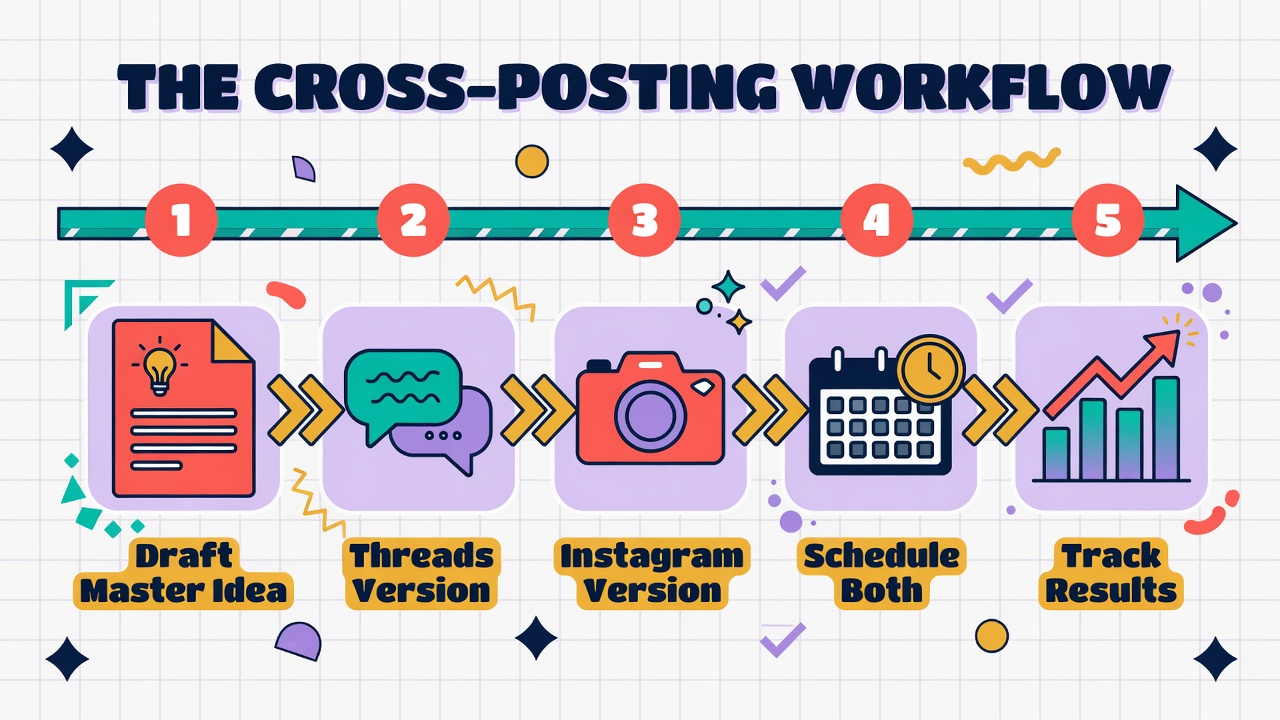
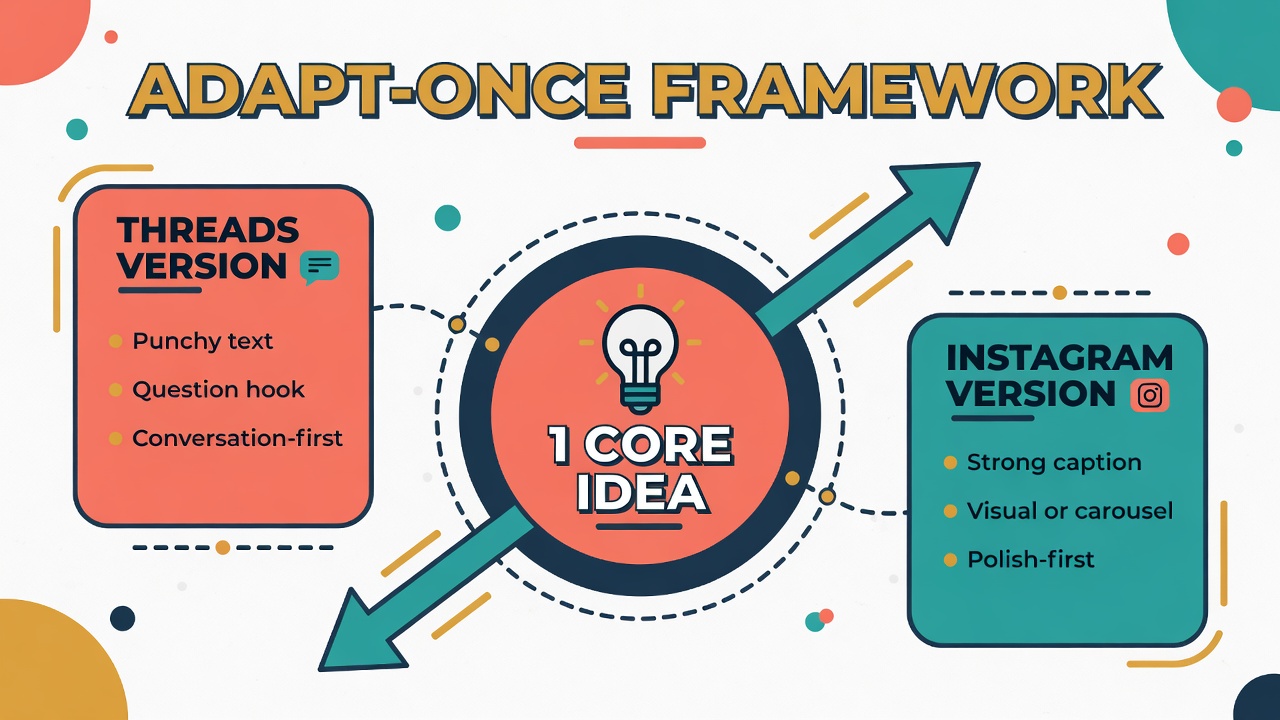
This is the core of everything. One idea becomes two platform-native versions. Not two ideas. Not two drafts. One idea, two formats. The whole thing takes about twelve minutes once you have done it a few times.
Start with what I call the master draft. This is a plain-text brain dump of your idea. No formatting, no platform thinking. Just write the core message in three to five sentences. What is the insight? What is the hook? What is the takeaway? This takes about three minutes and it is the only creative heavy lifting you do.
Now adapt for Threads. Take your master draft and turn it into a punchy, conversational post. Lead with a bold statement or a question. Keep it text-first. Add one relevant hashtag, maybe two. Threads rewards posts that feel like someone talking, not a brand announcement. This adaptation takes about four minutes.
Then adapt for Instagram. Take the same master draft and think about the visual. Could it be a carousel with four or five slides? A single photo with a strong caption? A short reel script? Write the caption to complement the visual, not repeat it. Instagram captions can be longer than Threads posts, so you have room to add context or a call to action. This takes about five minutes. Here is a real example. Last month I wrote a master draft about how I tested six price points on Gumroad. The Threads version was a five-line post asking people to guess which price point won. It got about twelve thousand impressions and forty-seven replies. The Instagram version was a six-slide carousel showing the price ladder with the winner circled in red. It got about eight thousand reaches and ninety-two saves. Same idea, different packages, combined reach of twenty thousand from one twelve-minute adaptation session. Want to know which tools make the scheduling part painless?
Posting identical text to both platforms without adapting the format for each one
Scheduling both versions at the exact same minute instead of staggering by two to four hours
Treating Threads like Instagram by over-producing content instead of keeping it conversational
Creating two separate ideas from scratch instead of adapting one master draft
Posting every single day to both platforms and burning out within three weeks
Best Tools to Schedule Threads and Instagram Together in 2026
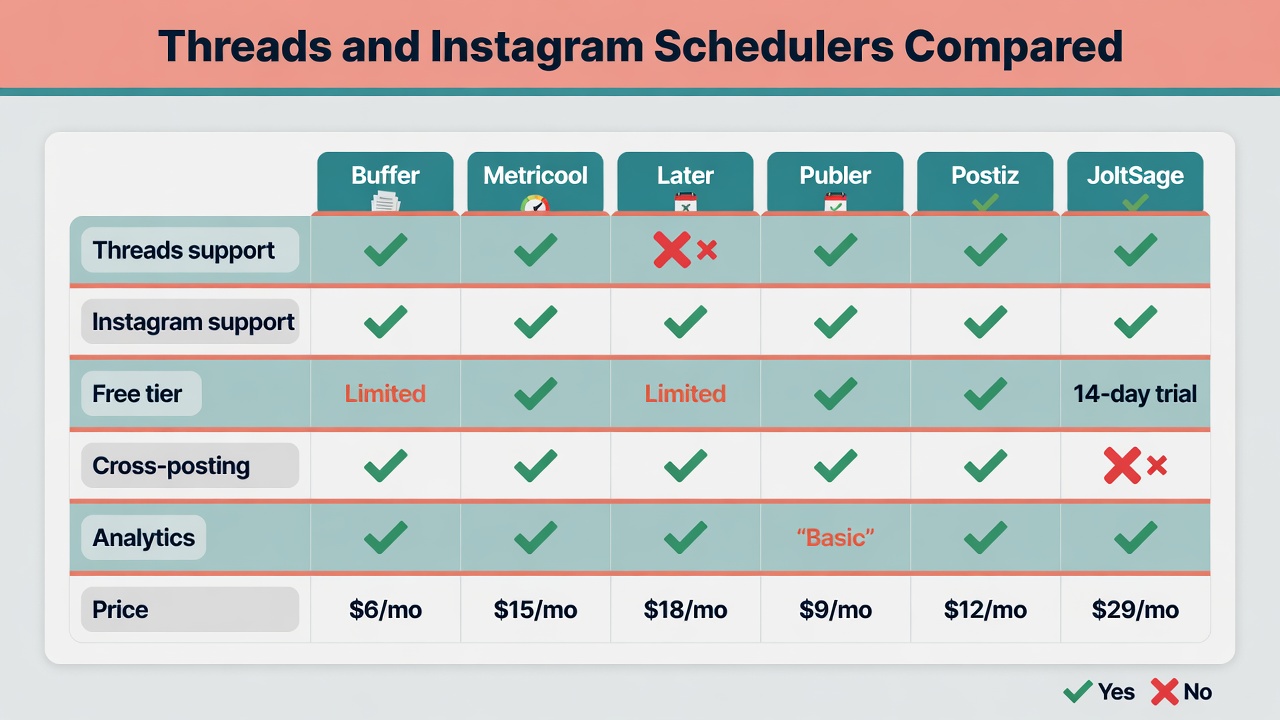
I have tested six tools specifically for cross-posting between Threads and Instagram. Here is what I found, including the catches that their landing pages will not tell you.
Buffer is the tool I recommend most for solo creators who want simplicity. The free tier lets you connect up to three channels and schedule up to ten posts per channel. The interface is clean, the queue system is intuitive, and it supports both Threads and Instagram. The catch is that the free tier is limited. If you post daily to both platforms, you will hit the ten-post limit fast and need the six-dollar-per-month Essentials plan.
Metricool is the best pick if you live in analytics. It has one of the most generous free tiers in the industry. You can connect Threads and Instagram, schedule posts, and get detailed performance reports. The catch is that the interface has a learning curve. It is powerful but not immediately intuitive. Plan to spend an afternoon setting it up.
Later is strong for visual planning. If your Instagram strategy revolves around grid aesthetics and carousel design, Later's visual calendar is excellent. The catch is that its Threads support is newer and less polished than Buffer or Metricool. Some scheduling features for Threads are still rolling out as of mid-2026. Publer is great for teams. It supports bulk scheduling, AI caption suggestions, and repurposing across many platforms including Threads and Instagram. The catch is pricing. The free tier is very limited and the paid plans start at twelve dollars per month per user. For a solo creator that feels steep. Postiz is the open-source option. You can self-host it for free and it supports Threads, Instagram, and twenty-plus other platforms with AI features built in. The catch is setup. If you are not comfortable with Docker and a VPS, this is not your tool. If you are technical, it is hard to beat on value. JoltSage is built specifically for Threads-first creators who also need Instagram. It handles the adapt-once workflow natively. You draft once in the Post Composer, create platform-specific versions, and schedule both from a single calendar. It also includes a reply workflow and Threads-specific analytics that generic tools do not offer. The catch is that it is newer, so some integrations are still maturing. For a Threads-first creator, the workflow fit is unmatched. Ready to figure out when exactly to hit schedule on each platform?
The Optimal Posting Schedule for Both Platforms
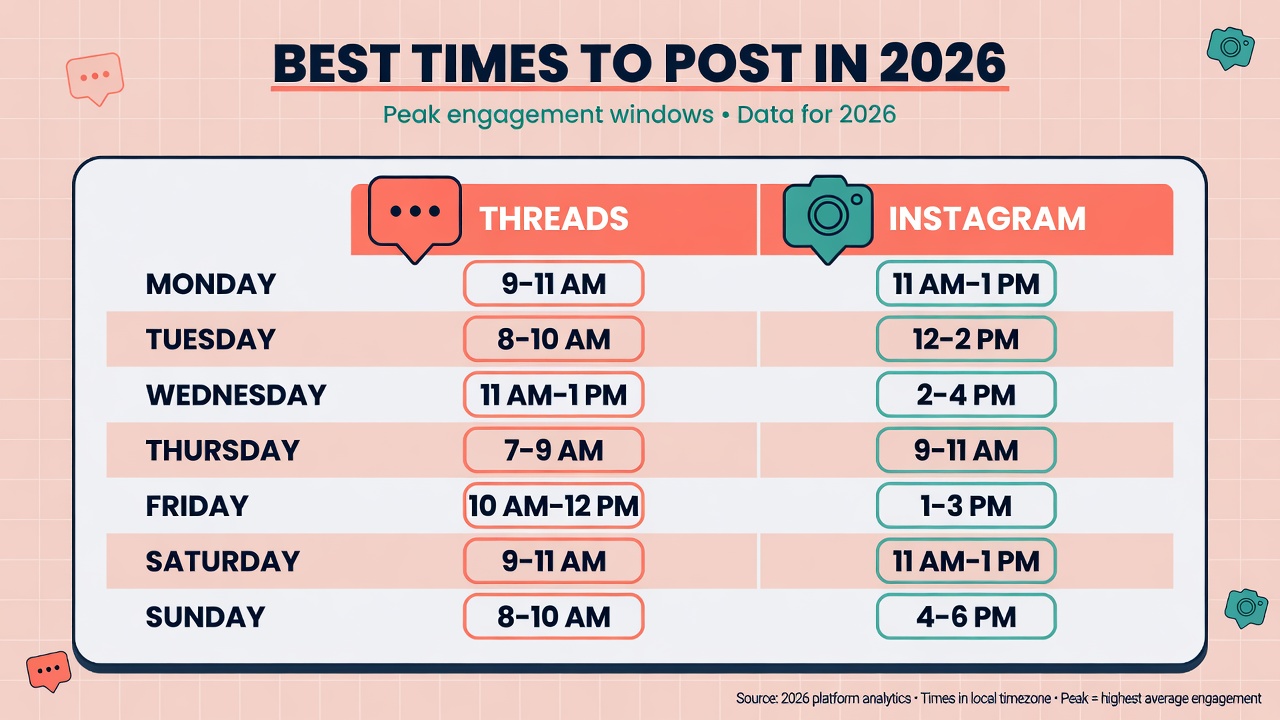
Here is something that surprised me when I dug into the data. Threads and Instagram do not peak at the same time. Not even close. If you schedule the same content to both platforms at the same minute, you are leaving reach on the table.
Based on aggregated engagement data from twenty-five million posts analyzed in early 2026, Threads peaks between 9 AM and 11 AM on weekdays. The conversation-driven format means people engage when they are in a work-and-scroll mindset. Instagram, on the other hand, peaks between 11 AM and 1 PM and again from 7 PM to 9 PM. The visual format performs better during lunch breaks and evening relaxation.
This means the optimal strategy is to stagger your cross-posted content. Post the Threads version in the morning window, then schedule the Instagram version for the lunch or evening window. You are reaching different audience mindsets at their peak engagement times. Same idea, two waves, maximum reach.
For frequency, here is what the data supports. On Threads, posting four to seven times per week is the sweet spot for growth without burnout. On Instagram, three to five posts per week (feed posts, not Stories) maintains algorithm favor. If you cross-post, you do not need to hit both platforms every day. Three to four cross-posted ideas per week, adapted for both platforms, gives you six to eight total posts across both channels. That is enough to stay visible without burning out. One mistake I made early on: scheduling both versions back to back. I posted the Threads version at 9 AM and the Instagram version at 9:05 AM. My combined reach was about twenty percent lower than when I started staggering by two to four hours. The algorithm seems to favor content that spreads across the day rather than clustering. How do you make this repeatable without thinking about it every morning? That is where JoltSage comes in.
How JoltSage Makes Threads Plus Instagram Cross-Posting Actually Scalable
I want to be honest here. For the first three months of my cross-posting journey, I used Buffer and a Google Doc. It worked. It was fine. But every week I spent about twenty minutes manually managing two separate queues, copying adapted text between tools, and checking that I had not double-booked a time slot. It was friction.
Then I moved to JoltSage and the friction disappeared. Here is why. JoltSage was built Threads-first, which means its Post Composer, ThreadStorm, and Scheduler are designed around how Threads actually works. The conversation format, the reply-first culture, the text-heavy feed. When I added Instagram to the mix, I could draft in the Post Composer, create a Threads-native version and an Instagram-native version, and schedule both from the same calendar view.
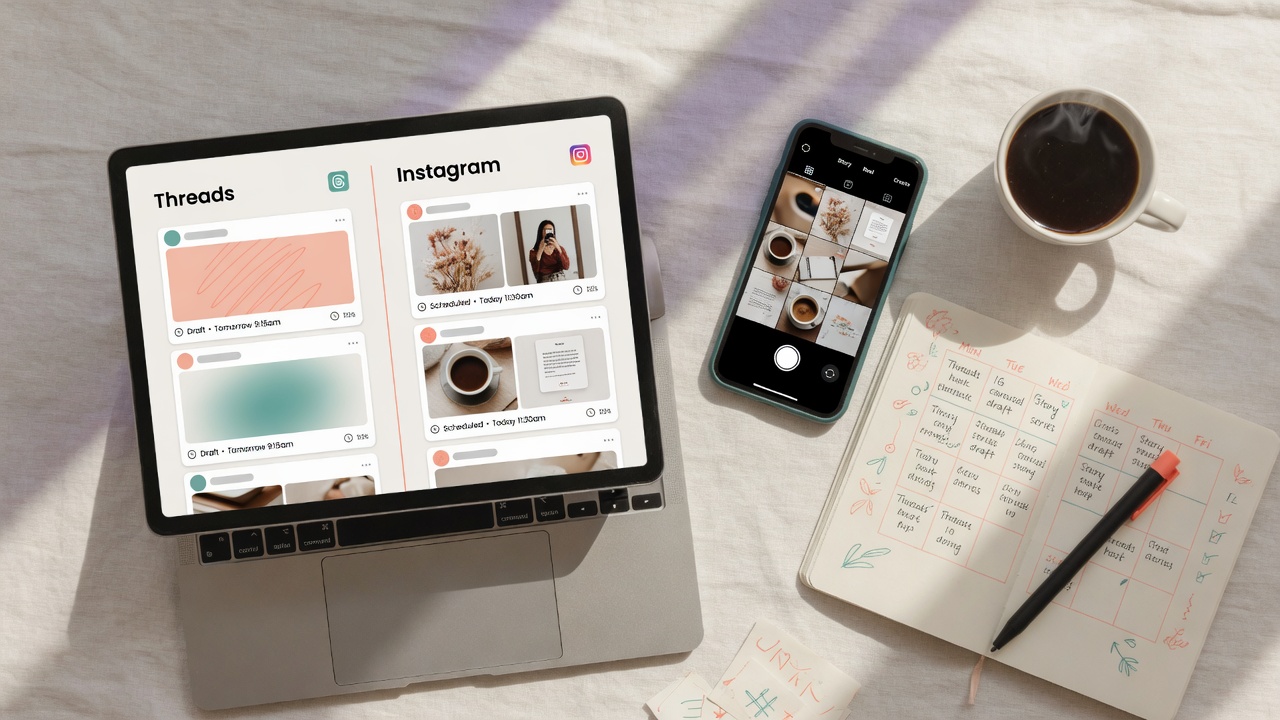
The workflow looks like this. Monday morning I batch-draft five master ideas in the Post Composer. Monday afternoon I spend about forty minutes adapting each idea into two versions. Then I drag them onto the content calendar, stagger the times (Threads in the morning, Instagram at lunch), and I am done for the week. Total time: about ninety minutes.
The part that sold me was the reply workflow. Threads is a conversation platform. If you post and ghost, your growth stalls. JoltSage has a dedicated Replies tool that surfaces inbound comments so you can respond in minutes instead of scrolling through notifications. No other Threads scheduler I have tested has this built in. It is usually a separate tool or a manual process. JoltSage also gives you Threads-specific analytics. You can see which posts drove replies, which hooks performed, and how your cross-posted content performed side by side with your Instagram metrics. For a creator who treats content as a growth channel, this visibility is the difference between guessing and optimizing. Want a concrete plan to start this week?
Your 7-Day Threads Plus Instagram Cross-Posting Plan
Here is a copy-paste plan you can start this Monday. No overthinking required. I have run variations of this plan for three months and it consistently produces six to eight posts per week across both platforms in under two hours of total work.
Monday is batch day. Sit down for thirty minutes and write five master drafts. These are plain-text brain dumps, three to five sentences each. Do not format them. Do not think about platforms. Just capture five ideas. Put them in a doc or in JoltSage's Post Composer.
Tuesday is adapt day. Take your five master drafts and spend about eight minutes on each. Create a Threads version and an Instagram version. By the end of Tuesday you have ten platform-native posts ready to schedule. Total time: about forty minutes.
Wednesday through Friday is schedule and engage. Load your adapted posts into your scheduler. Set Threads posts for the 9 to 11 AM window and Instagram posts for the 11 AM to 1 PM window. Then spend fifteen minutes each day replying to comments. That is it. The content is already queued. Saturday is review day. Spend ten minutes checking which posts performed best on each platform. Note any hooks or formats that overperformed. This feeds next Monday's batch session so you are not starting from scratch. Sunday is rest day. Seriously. One of the biggest mistakes creators make is posting seven days a week and burning out. Your audience does not need daily content from you. They need consistent, good content. Four cross-posted ideas per week across two platforms gives you eight touchpoints. That is plenty. After one week, check your combined reach. Compare it to the previous week when you were posting to one platform or posting separately. Most creators see a fifty to one hundred percent reach increase within the first two weeks of consistent cross-posting. The math is simple: two platforms, adapted content, staggered timing. That is the formula. Try JoltSage free and run this plan starting Monday.
Action checklist
Use this as the practical next pass after reading the guide.
- +Write five master drafts in plain text without thinking about platforms
- +Adapt each draft into a Threads version and an Instagram version
- +Choose a scheduler that supports both platforms (Buffer, Metricool, or JoltSage)
- +Schedule Threads posts for morning windows and Instagram posts for lunch or evening
- +Spend fifteen minutes daily replying to comments on both platforms
- +Review performance every Saturday and feed insights into next week's batch
Frequently asked questions
Can I schedule Threads and Instagram posts at the same time?
Yes, but you should not post them at the exact same minute. Use a cross-posting scheduler like Buffer, Metricool, or JoltSage to queue both versions, then stagger them by two to four hours. Threads peaks in the morning and Instagram peaks around lunch and evening, so timing each version for its peak window maximizes reach.
Does Meta Business Suite let you schedule Threads?
Meta Business Suite does support scheduling for both Threads and Instagram, but it does not help you adapt content for each platform. It is fine if you want to schedule the same post to both, but for the adapt-once workflow you are better off with a dedicated scheduler like Buffer or JoltSage.
What is the best free tool to cross-post Threads and Instagram?
Buffer and Metricool both offer free tiers that support Threads and Instagram scheduling. Buffer gives you up to ten scheduled posts per channel for free. Metricool has a more generous free tier with detailed analytics. For Threads-first creators, JoltSage offers a free trial with the full adapt-once workflow built in.
Should I post the exact same content on Threads and Instagram?
No. Each platform rewards different formats. Threads favors punchy, conversational text with question hooks. Instagram favors visuals with complementary captions. Take one core idea and adapt it into two platform-native versions. This takes about twelve minutes per idea and performs significantly better than copy-pasting.
How often should I post on both Threads and Instagram?
For Threads, four to seven posts per week is the sweet spot. For Instagram feed posts, three to five per week works well. If you cross-post, three to four adapted ideas per week give you six to eight total posts across both platforms, which is enough to stay visible without burning out.
Can I schedule Instagram Reels and Threads together?
Yes, most modern schedulers support scheduling Instagram Reels alongside Threads posts. Buffer, Metricool, and JoltSage all handle Reels scheduling. The adapt-once principle still applies: turn your idea into a Threads text post and an Instagram Reel script, then schedule both from the same calendar.
Is cross-posting bad for engagement?
Cross-posting identical content without adaptation can hurt engagement on both platforms. But adapting one idea into two platform-native versions actually boosts engagement because you are respecting how each platform works. The key is adapting the format, not just copying the text.
How do I track performance across both platforms?
Use a scheduler with built-in analytics for both platforms, like Metricool or JoltSage. Track combined reach, engagement rate per platform, and which hooks or formats perform best on each. Review your numbers weekly and feed those insights into your next batch of content.
Conclusion
Cross-posting Threads and Instagram is not about doing more work. It is about doing the right work once and adapting it smartly. One idea, two formats, staggered timing, and a scheduler that handles the logistics.
Start with five master drafts this Monday. Adapt them Tuesday. Schedule them by Wednesday. By Saturday you will have data showing whether your combined reach grew. It almost always does.
If you want a tool that was built for this exact workflow, try JoltSage free. Draft once, adapt for both platforms, and schedule from one calendar. No more juggling tools or rewriting the same idea twice.