What this guide is really about
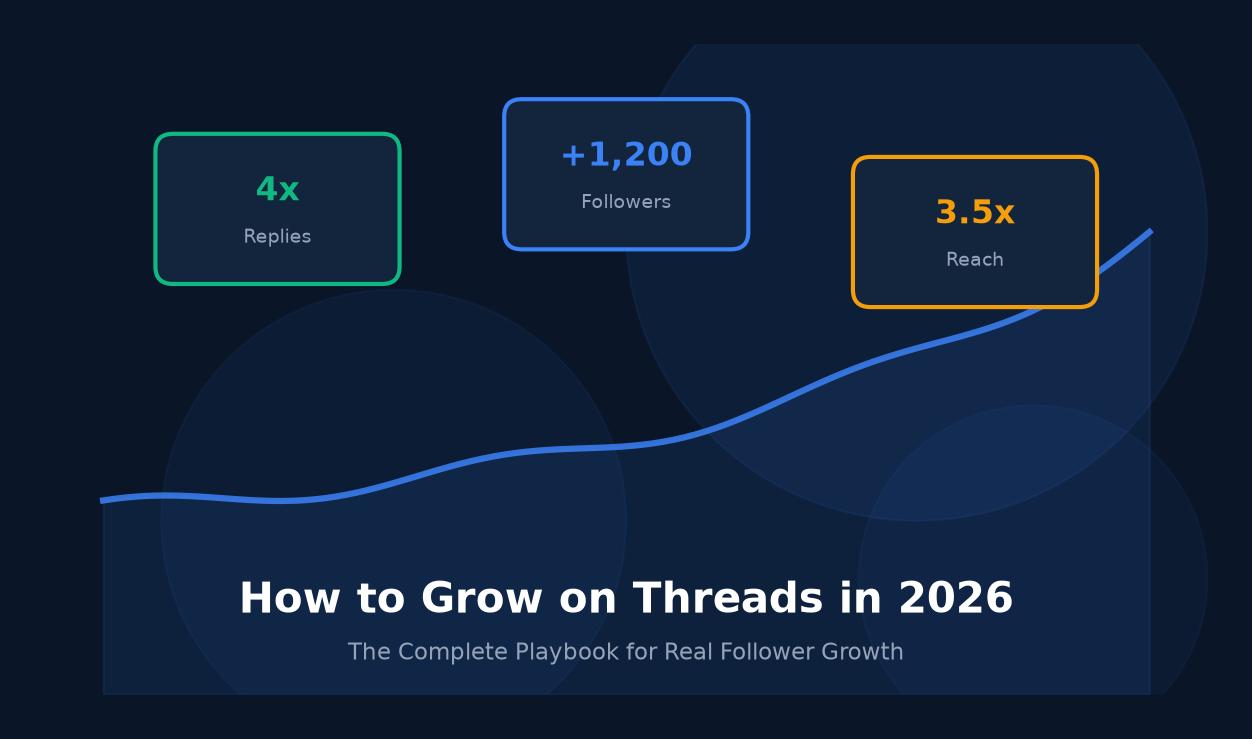
Most brands got burned on the last next big platform. Clubhouse. BeReal. Vine. You remember the hype. So when Threads launched, smart marketers waited. Now it's 2026, and the data tells a different story. Threads has crossed 300 million monthly users, and the engagement looks nothing like the ghost towns you've been burned by before.
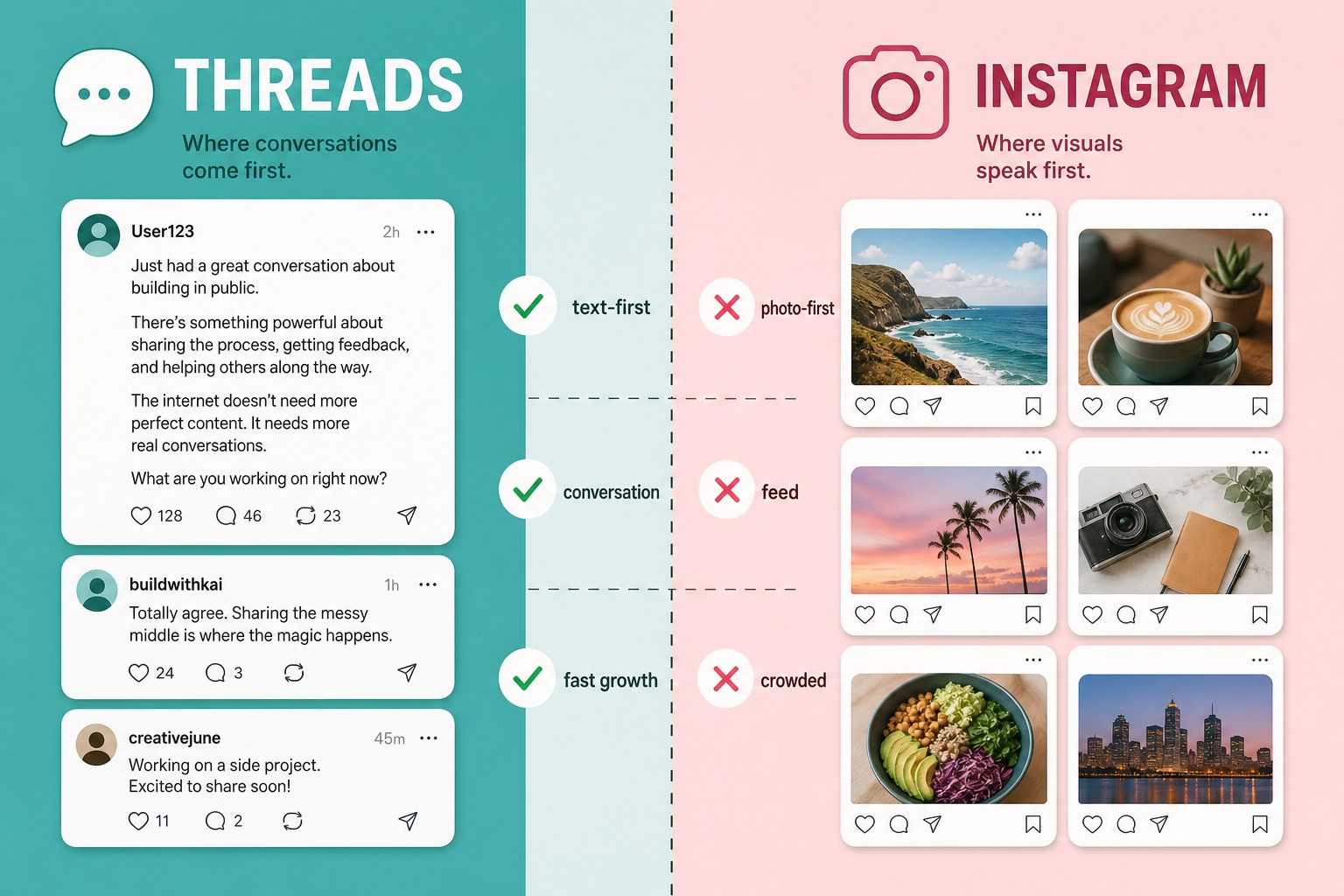
Here's the honest truth. Threads works differently than every other app in your stack. It's text-first, conversation-driven, and the algorithm rewards replies over polish. Brands that treat it like a mini Instagram feed get crickets. Brands that treat it like a group chat with their customers are winning.
This guide breaks down exactly how to use Threads for business in 2026. Profile setup, content strategy, scheduling, growth, and the metrics that matter. By the end you'll have a repeatable system you can run in under 90 minutes a week.
Threads is worth it for business in 2026 if you treat it as a conversation channel, not a billboard. Post 1 to 3 times per day, lead with text hooks, reply within hours, cross-post to Instagram, and use a content calendar plus scheduler to stay consistent. Most brands see meaningful engagement within 30 to 45 days.

How to set up a Threads profile that converts visitors into followers
A repeatable content strategy built for text-first engagement
A scheduling system you can run in 90 minutes a week
The metrics that signal real growth on Threads
Threads rewards conversation over polish. Reply-first accounts grow faster than broadcast-first ones.
Post 1 to 3 times per day. Consistency beats volume and consistency beats perfection.
Batch your content weekly and schedule across Threads and Instagram to save hours.
Track replies, reposts, and profile visits. Raw impressions are vanity and will mislead you.
Engage 15 minutes daily with 5 to 10 niche accounts. That compounds into real growth.
Why Threads deserves a real spot in your 2026 marketing stack
The social media landscape in 2026 is crowded. Instagram is saturated. X has fragmented. TikTok is powerful but exhausting. Threads sits in a sweet spot most brands haven't figured out yet. It has over 300 million monthly active users, the audience leans toward professionals, and organic reach is still generous because sponsored posts haven't taken over.
Here's the real reason Threads matters. The algorithm rewards replies. Not likes. Not follower count. Replies. That means a brand account with 200 followers can start a conversation that reaches 20,000 people. Try that on Instagram without an ad budget. You can't.
I watched a small skincare brand test this last quarter. They posted on Instagram for six months with almost zero comments. Crickets. They repurposed the same ideas into text posts on Threads. Short opinions about ingredients. Questions about packaging waste. In one week they got five times more replies than six months on Instagram combined. Those replies turned into over 40 direct customer DMs asking about products and wholesale.
That's not a fluke. It's the platform working as designed. Threads is conversation-first, and conversations convert when you let them breathe. So the question isn't whether Threads deserves your time. It's whether you're willing to show up like a person instead of a press release. Ready to set up your profile so it actually pulls people in?
Set up your Threads profile for business discovery
Your profile is your storefront. On Threads, people decide in about two seconds whether to follow you based on your bio and your last few posts. Skip the setup and you'll bleed followers before they read a single post.
Start by connecting Threads to your Instagram. Meta makes this almost automatic, and it carries over your username, photo, and verification. Then switch to a professional account in settings. This unlocks analytics, basic promotions, and integration with Meta Business Suite. If you've been asking about meta business suite threads support, this is where it lives.
Your bio needs to do one job. Tell people what outcome you deliver and who you deliver it for. "Marketing agency helping brands grow" is fine. "We help DTC skincare brands double repeat purchases in 90 days" is magnetic. A business coach I worked with tested this. Her original bio said "Helping entrepreneurs grow." Vague. She changed it to "I help service-based coaches hit $20K months without ads." One specific outcome. Profile clicks doubled in nine days.
Your last three posts matter more than your bio though. When someone clicks your profile, they scroll your recent feed first. Make sure those posts represent the conversation you want to be known for. Want to fill that feed with content that performs? Let's talk strategy.
The content strategy that actually builds a brand on Threads
Threads is a text-first platform. That trips up brands used to leading with polished visuals. You don't need a design team here. You need a point of view and the willingness to share it.
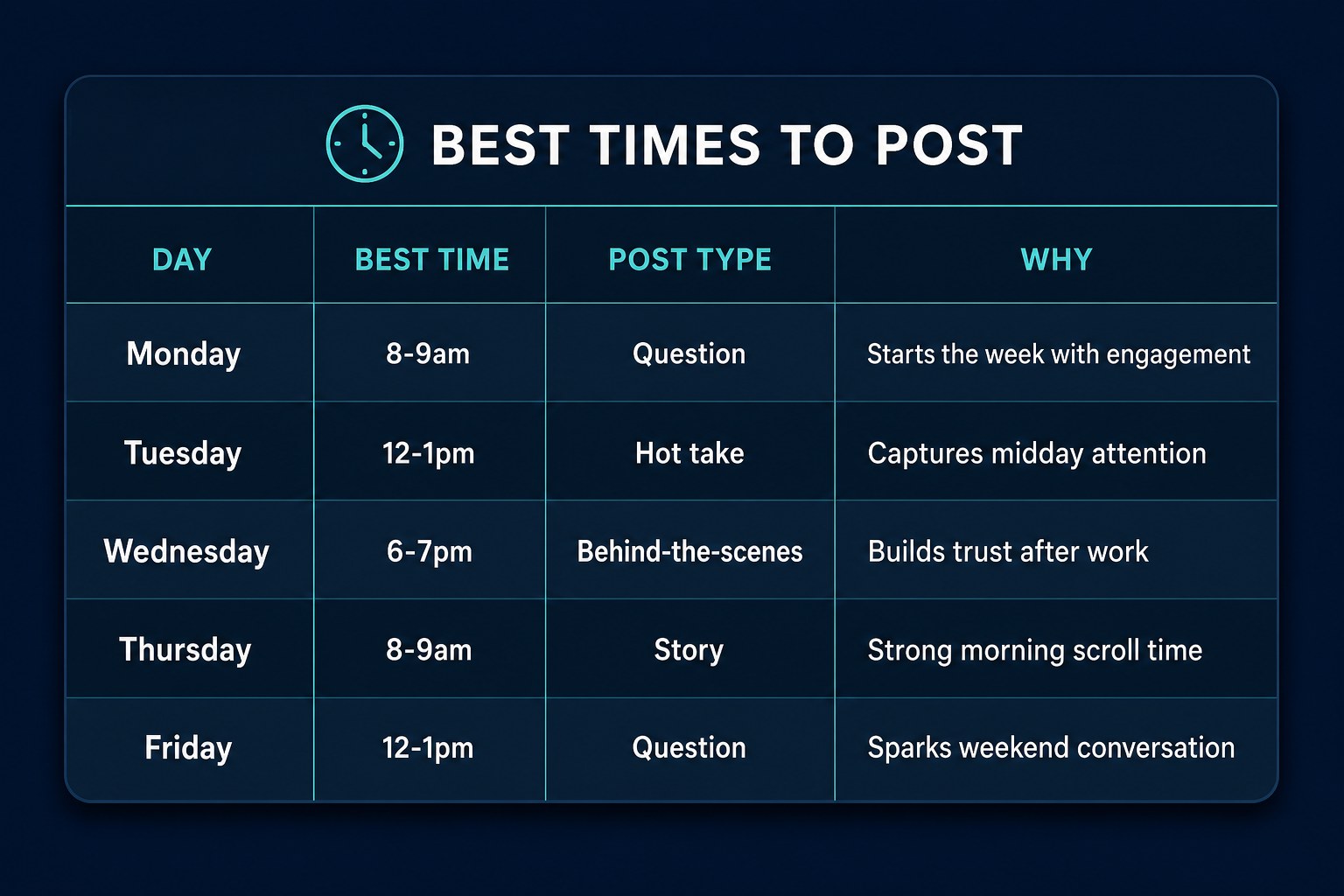
The formats that perform best fall into four buckets. Hot takes that take a stance people can react to. Behind-the-scenes moments showing the messy reality of running a business. Open questions inviting your audience to weigh in. And value threads that teach something specific. Mix all four and you'll never run dry.
Hooks matter more than anything. Your first line decides whether someone expands the post or scrolls past. "We just fired our biggest client" beats "Here's a lesson about boundaries" every time. Write the hook first, then the post. For frequency, aim for one to three posts per day. Consistency beats volume.
I tested this last month. Same account, same topics, two approaches. Week one was bold statements. "Email marketing is overrated." "Most founders quit too early." Week two was the same ideas as questions. "What's the one marketing channel you keep coming back to?" The question posts got three times the replies. Same effort, different result. Threads rewards curiosity over certainty. And if you want the best time to post on Threads for your audience, your analytics will reveal it within a couple weeks. Curious how to keep this pace without living on your phone? That's next.
Treating Threads like Instagram and leading with visuals instead of punchy text hooks
Posting in random bursts and going silent for days instead of maintaining daily rhythm
Never replying to other accounts and expecting followers to find you on their own
Tracking raw impressions instead of replies and profile visits that signal real interest
Writing vague bios that don't tell people what specific outcome you deliver
Plan and schedule your Threads content without burning out
Consistency is the whole game on Threads. But consistency without a system is a recipe for burnout. You need a content calendar and a batching habit that fits your actual schedule.
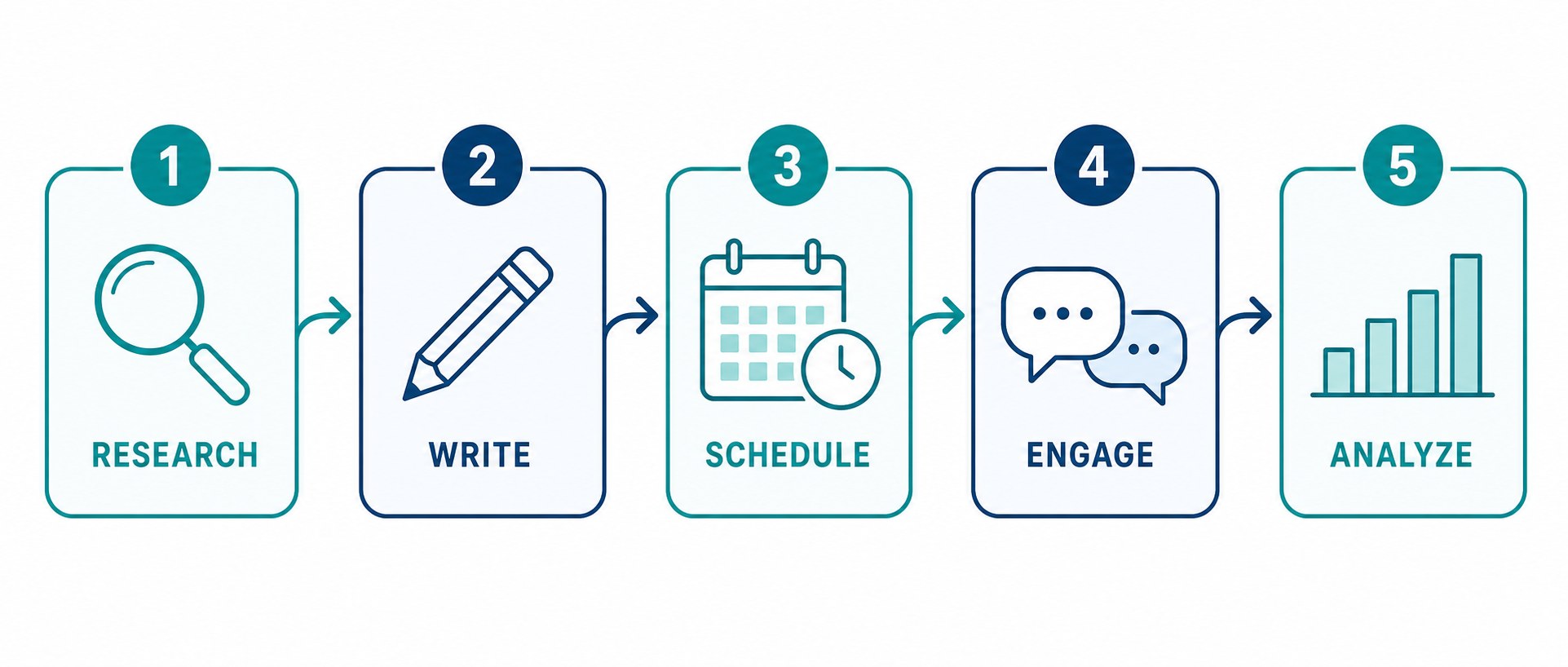
Pick one 90-minute block per week. Monday morning, Friday afternoon, whatever works. During that block, write all your Threads posts for the week. Just seven days. That keeps quality high because you're not forcing content when drained. Draft hooks, write posts, schedule, done.
This is where a scheduling tool earns its keep. You can post manually, but most brands quit by week three because the daily grind eats too much energy. If you're figuring out how to schedule Threads posts without doubling your workload, JoltSage lets you plan a full week and schedule across Threads and Instagram in one place. You write once, publish twice, and your content calendar lives in the same dashboard as your analytics.
I started the Monday 90-minute block eight months ago. Before that I posted when inspiration struck, meaning twice a week, and wondered why nothing grew. Once I committed to the weekly block, I had 14 to 21 posts scheduled every Monday morning. Engagement tripled in six weeks and I spent less time on the platform. Cross-posting is the multiplier. Take Threads text posts and adapt them into Instagram captions. Same ideas, two platforms, one workflow. Want to know what happens after posts go live? Let's talk conversations.
Grow your Threads audience through real conversations
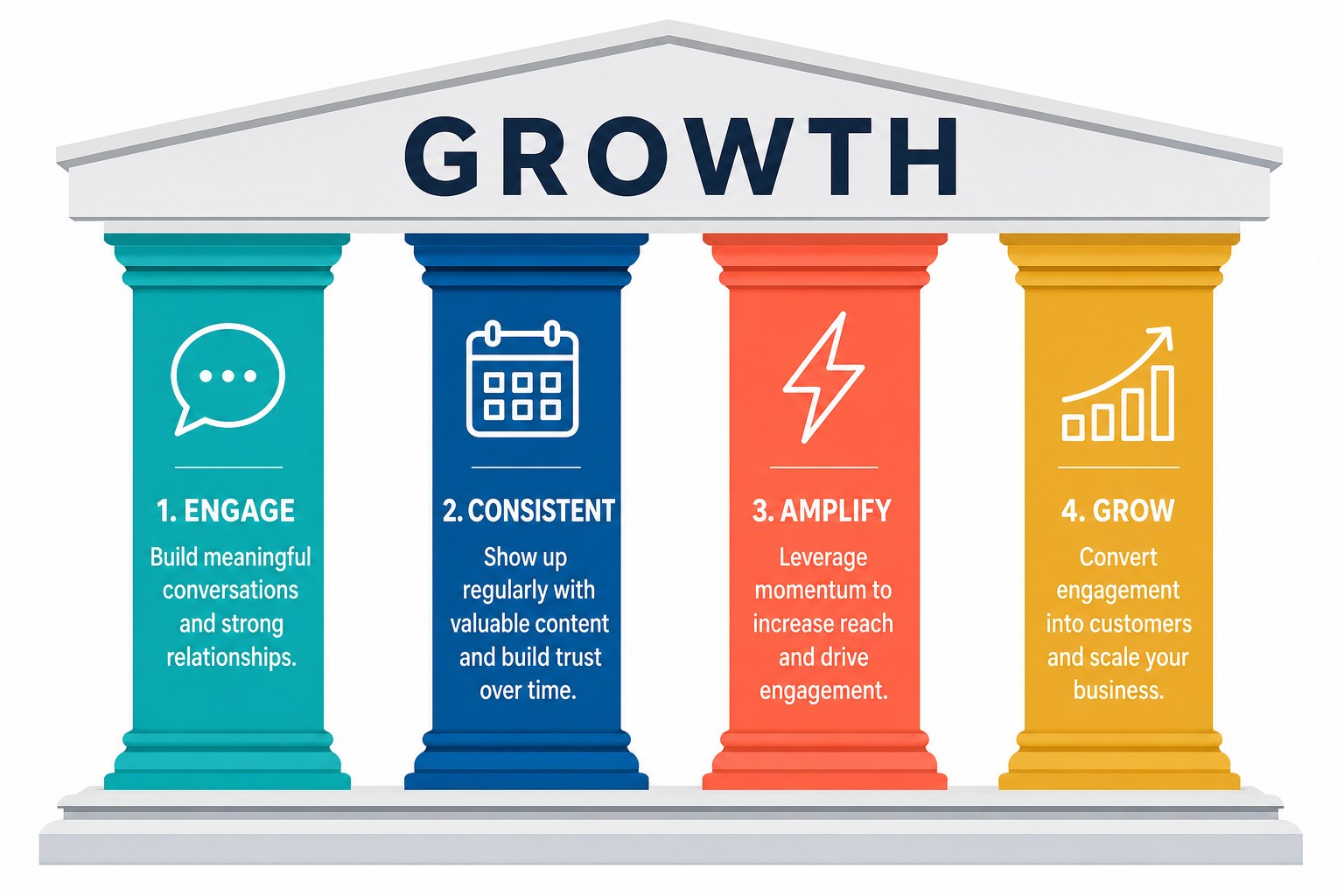
Posting is half the job. The other half is showing up in other people's comments. Threads is a conversation platform, and the accounts that grow fastest treat engagement as strategy, not an afterthought.
Here's the system. Spend 15 minutes daily replying to 5 to 10 accounts in your niche. Not likes. Actual replies that add something. Share a related experience. Ask a follow-up question. Disagree with a reason. Your goal is to be interesting enough that people click your profile.
Pick accounts that share your audience but aren't competitors. Sell skincare? Engage with dermatologists and wellness creators. Run a B2B SaaS? Jump into conversations from operators and consultants. When someone replies to your posts, respond within hours. The first 48 hours after a post goes live are when Threads decides whether to push it further.
A SaaS founder I advise started this routine in January. Fifteen minutes a day, five to ten replies, nothing fancy. She tripled her follower count in 60 days. She didn't go viral. She didn't change her content. She just showed up consistently and people noticed. Community compounds. Those followers stick around, reply to future posts, and become customers. Wondering how to know if it's working? Let's talk numbers.
Measure what matters: the Threads analytics that signal growth
Most brands track the wrong things on Threads. They watch impressions and follower count, then get discouraged when numbers look small compared to Instagram. Here's the reframe. Focus on depth of engagement, not width of reach.
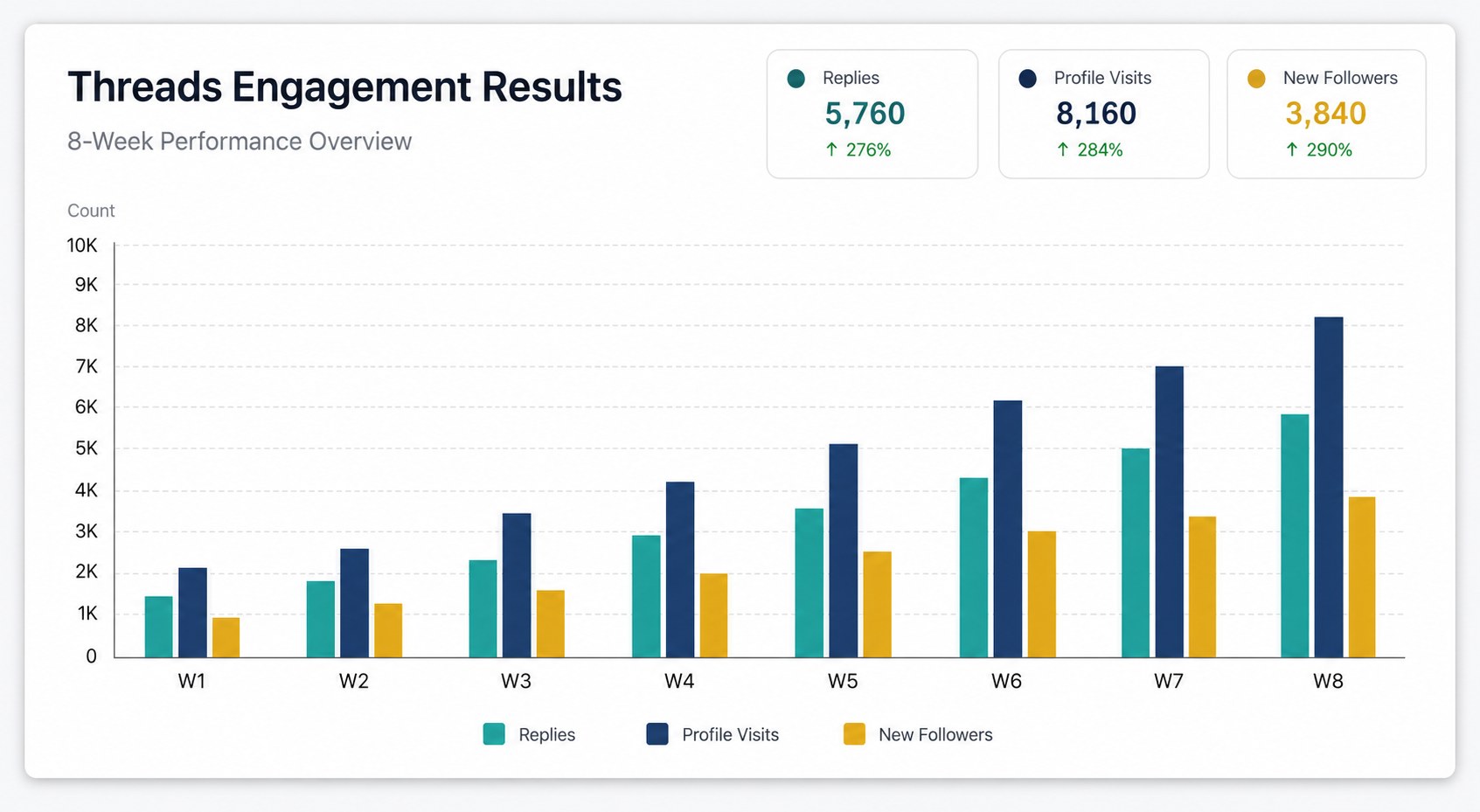
Four metrics matter. Replies, because they signal conversation and the algorithm loves them. Reposts, because they signal your content is worth amplifying. Profile visits, because they signal genuine interest beyond a scroll. And follower growth rate, because steady growth beats viral spikes that fade.
Skip raw impressions. They tell you how many people saw your post fly by, not if anyone cared. A post with 2,000 impressions and 40 replies is healthier than one with 20,000 impressions and 2 replies. I learned this the hard way. For two months I tracked impressions religiously. One post hit 45,000 impressions. It got 3 replies. That same week a post with 1,800 impressions pulled 52 replies and 11 profile visits. The small post brought 8 new followers. The viral one brought zero. Replies drove three times more profile visits than impressions.
Read analytics weekly, not daily. Daily creates emotional whiplash. Weekly reveals patterns. Look for which hooks get replies, which topics drive visits, and which days perform best. Then do more of what works. Ready to put it all into one workflow?
How JoltSage makes Threads for business actually scalable
Everything in this guide comes down to one challenge. Doing it consistently without it eating your entire week. That's where the right tools matter, and where most brands hit a wall around week three.
JoltSage brings the pieces together. Your content calendar, scheduler, cross-posting, and analytics live in one dashboard. Plan your week in a single session, schedule across Threads and Instagram, and track what's working without bouncing between five tabs. The calendar view shows your whole week at a glance so you can spot gaps.
The scheduler publishes at the times your analytics say perform best. The analytics panel shows replies, reposts, and profile visits in real time, not vanity impressions. Start with the free Threads post creator if you want to test the workflow before committing to a full plan. Then browse the JoltSage blog for deeper guides on engagement and growth tactics.
Here's the honest part. JoltSage exists because running Threads manually is unsustainable for most businesses. The brands winning in 2026 aren't the ones with the most free time. They're the ones with the best systems. You need a workflow that handles the busywork so you can focus on the conversation. So here's the real question. Are you going to keep posting whenever you remember, or are you ready to build a Threads presence that actually grows?
Action checklist
Use this as the practical next pass after reading the guide.
- +Switch to a professional account and connect Threads to Instagram and Meta Business Suite
- +Rewrite your bio with one specific outcome and one clear link
- +Block 90 minutes per week to batch and schedule your Threads content
- +Post 1 to 3 times daily using hot takes, questions, and behind-the-scenes stories
- +Spend 15 minutes daily replying to 5 to 10 niche accounts with thoughtful responses
- +Review analytics weekly and double down on hooks that drive replies
Frequently asked questions
Is Threads good for business in 2026?
Yes. With over 300 million monthly users and an algorithm that rewards replies, Threads is one of the best organic growth channels for brands. The key is treating it as a conversation platform, not a broadcast feed.
How often should a business post on Threads?
Aim for 1 to 3 posts per day. Consistency matters more than volume, so pick a sustainable pace and stick with it. Most growing brand accounts post at least twice daily.
Can I schedule Threads posts for free?
Yes. JoltSage offers a free Threads post creator that lets you draft and schedule posts without a paid plan. You can plan a full week of content and publish automatically.
Does Threads work for B2B companies?
It does. B2B founders and consultants are among the fastest-growing accounts on Threads because the text-first format favors thought leadership and industry conversation over visuals.
How do I connect Threads to Meta Business Suite?
Switch your Threads account to a professional account in settings, then link it to your Instagram. Meta Business Suite will detect the connection and pull Threads data into your dashboard.
What is the difference between Threads and Instagram for business?
Threads is text-first and conversation-driven. Instagram is visual-first and feed-driven. Threads rewards replies and discussion. Instagram rewards polished content. Most brands benefit from using both.
How long does it take to see results on Threads?
Most brands see meaningful engagement within 30 to 45 days of consistent posting. Follower growth typically accelerates around 60 days if you're replying to other accounts daily.
Can I cross-post from Instagram to Threads?
Yes. When you publish on Instagram you can share the same post to Threads. For more control over timing and formatting, tools like JoltSage let you schedule across both platforms in one workflow.
Conclusion
Threads in 2026 is a wide-open opportunity for brands willing to show up like humans. The platform rewards conversation, consistency, and specificity. Post with intention, reply with genuine interest, and track the metrics that matter.
The brands that win won't be the ones with the biggest teams. They'll be the ones with the best systems. A content calendar, a scheduling workflow, and clear analytics turn Threads from a side experiment into a reliable growth channel.
JoltSage was built for this. Plan your week, schedule across platforms, and track real engagement in one place. Try the free Threads post creator today.